<?xml version="1.0" encoding="utf-8"?>
<feed xmlns="http://www.w3.org/2005/Atom">
        <?xml-stylesheet type="text/css" href="http://blog.spamt.net//styles/feed.css"?>
<title type="html">Stolzer DNS Spammer</title>
<link rel="alternate" type="text/html" href="http://blog.spamt.net/"/>
<link rel="self" type="application/atom+xml" href="http://blog.spamt.net//atom.xml"/>
<updated>2009-12-11T18:26:53+01:00</updated>
<author>
<name>Ulrich Dangel</name>
<uri>http://blog.spamt.net/</uri>
</author>
<id>http://blog.spamt.net//</id>
<generator uri="http://nanoblogger.sourceforge.net" version="3.3">
NanoBlogger
</generator>

<entry>
<title type="html">Access partitions in loopback devices under linux</title>
<author>
<name>Ulrich Dangel</name>
</author>
<link rel="alternate" type="text/html" href="http://blog.spamt.net//archives/2009/12/11/access_partitions_in_loopback_devices_under_linux/index.html"/>
<id>http://blog.spamt.net//archives/2009/12/11/access_partitions_in_loopback_devices_under_linux/index.html</id>
<published>2009-12-11T18:22:55+01:00</published>
<updated>2009-12-11T18:22:55+01:00</updated>
<category term="Shell stuff" />
<content type="xhtml">
<div xmlns="http://www.w3.org/1999/xhtml">
<![CDATA[<p>
Ever needed to access a partition inside a block device not supporting partitions like
/dev/loop or software raid? There exists multiple solutions like specifying the offset
via losetup or patching the kernel. But this is error-prone and not very user friendly.</p>

<p>
    An easy and more user friendly way of supporting partition tables in any block
    device is <b>kpartx</b>. Besides the name, is has nothing to do with kde but is a
    tool from <a href="http://christophe.varoqui.free.fr/">multipath tools</a> to map
    partition tables to the device mapper.
</p>
<p>
After you installed kpartx you can easily create mappings from a block device with <i>
kpartx -a</i> and delete them via <i>kpartx -d</i>. For example:
<pre>
# echo p | fdisk /dev/loop0 
Command (m for help): 
Disk /dev/loop0: 102 MB, 102400000 bytes
255 heads, 63 sectors/track, 12 cylinders
Units = cylinders of 16065 * 512 = 8225280 bytes
Disk identifier: 0x00000000

      Device Boot      Start         End      Blocks   Id  System
      /dev/loop0p1               1           5       40131   83  Linux
      /dev/loop0p2               6          12       56227+  83  Linux

# kpartx -a /dev/loop0
# ls /dev/mapper/loop0p*
/dev/mapper/loop0p1  /dev/mapper/loop0p2
# kpartx -d /dev/loop0
# ls /dev/mapper/loop0*
ls: cannot access /dev/mapper/loop0*: No such file or directory
</pre>
</p>
To make a long story short: kpartx is a easy and handy solution for using partitions
from any block device under linux making management of images for virtual machines quite
simple.]]>
</div>
</content>

</entry>
<entry>
<title type="html">Bootstrapping Fedora to directories</title>
<author>
<name>Ulrich Dangel</name>
</author>
<link rel="alternate" type="text/html" href="http://blog.spamt.net//archives/2009/09/18/bootstrapping_fedora_to_directories/index.html"/>
<id>http://blog.spamt.net//archives/2009/09/18/bootstrapping_fedora_to_directories/index.html</id>
<published>2009-09-18T15:50:44+01:00</published>
<updated>2009-09-18T15:50:44+01:00</updated>
<category term="Shell stuff" />
<content type="xhtml">
<div xmlns="http://www.w3.org/1999/xhtml">
<![CDATA[Currently there is some <a href='http://www.lucas-nussbaum.net/blog/?p=385'>discussion</a>
on debian planet about installing Centos/Fedora to an directory under debian.<br>
As mentioned in the <a
href='http://www.lucas-nussbaum.net/blog/?p=385#comment-21968'>comments</a> and another
<a href='http://www.braincells.com/debian/index.cgi/search/item=230'>blog entry</a>
there exist several other simpler solutions.<br>
<p>
<a href='http://et.redhat.com/~rjones/febootstrap/'>febootstrap</a> allows you to
install centos/fedora really easily just like deboostrap.<br>
Example to install centos in directory c5:
<pre>
# febootstrap centos-5 c5 http://mirror.eunet.at/5.3/os/i386/
# .....
# chroot c5 cat /etc/redhat-release   
# CentOS release 5.3 (Final)
</pre>
</p>
<p>
<a href='http://thomas.apestaart.org/projects/mach/'>mach</a> is another more generic
way to bootstrap rpm based distributions to a directory. For an overview of the features
just have a look at the <a
href='http://mach.cvs.sourceforge.net/*checkout*/mach/mach2/README?revision=1.45'>README</a>
Example to install centos:
<pre>
$ mach -r centos-5-i386-os setup base 
</pre>
</p>
<p>
If you just want to install Fedora/Centos into some directory use <a
href='http://et.redhat.com/~rjones/febootstrap/'>febootstrap</a> as it is
quite simple and does the job. <br>
<b>But</b> if you want to rebuild rpms or bootstrap
any other rpm based distribution like SuSE, Yellowdog use <a
href='http://thomas.apestaart.org/projects/mach/'>mach</a>
</p>]]>
</div>
</content>

</entry>
<entry>
<title type="html">Unit testing for shell scripts with shunit2</title>
<author>
<name>Ulrich Dangel</name>
</author>
<link rel="alternate" type="text/html" href="http://blog.spamt.net//archives/2009/09/18/unit_testing_for_shell_scripts_with_shunit2/index.html"/>
<id>http://blog.spamt.net//archives/2009/09/18/unit_testing_for_shell_scripts_with_shunit2/index.html</id>
<published>2009-09-18T14:14:13+01:00</published>
<updated>2009-09-18T14:14:13+01:00</updated>

<content type="xhtml">
<div xmlns="http://www.w3.org/1999/xhtml">
<![CDATA[<p>
 Recently I stumbled upon a bug of an funtion in a
shellscript and wanted to make sure that this bug never happens again. So i searched around
and found <a href='http://code.google.com/p/shunit2/'>shunit2</a> a nice <a
href='http://en.wikipedia.org/wiki/XUnit'>xUnit</a> based test framework for shell scripts. 
</p>
<p>
If you ever had thought about writing unit tests for your shell scripts, do it! Its really easy, and <a href='http://code.google.com/p/shunit2/'>shunit2</a> also supports zsh <br>
Example test sript:
<pre>
#! /bin/sh
testEquality()
{
  assertEquals 1 1
}

. shunit2
</pre>
</p>
For more examples have a look at the <a
href='http://git.grml.org/?p=grml-autoconfig.git;a=tree;f=tests;'>tests for
grml-autoconfig</a> or at the example directory of the shunit2 package ]]>
</div>
</content>

</entry>
<entry>
<title type="html">cdn for debian or location aware entry in /etc/apt/sources.list</title>
<author>
<name>Ulrich Dangel</name>
</author>
<link rel="alternate" type="text/html" href="http://blog.spamt.net//archives/2009/08/29/cdn_for_debian_or_location_aware_entry_in_etcaptsources_list/index.html"/>
<id>http://blog.spamt.net//archives/2009/08/29/cdn_for_debian_or_location_aware_entry_in_etcaptsources_list/index.html</id>
<published>2009-08-29T19:45:30+01:00</published>
<updated>2009-08-29T19:45:30+01:00</updated>

<content type="xhtml">
<div xmlns="http://www.w3.org/1999/xhtml">
<![CDATA[<p>
The upcoming <a href='http://grml.org/'>grml</a> release will use <a
href='http://wiki.debian.org/DebianGeoMirror'>cdn.debian.net</a> per
default in /etc/apt/sources.list to always use a mirror near to your location.
</p>
To use it, just replace existing host names with cdn.debian.net.
<br />
Example:
<pre>
deb http://cdn.debian.net/debian stable main contrib non-free 
</pre>]]>
</div>
</content>

</entry>
<entry>
<title type="html">Automatic security updates for Debian based systems</title>
<author>
<name>Ulrich Dangel</name>
</author>
<link rel="alternate" type="text/html" href="http://blog.spamt.net//archives/2009/06/20/automatic_security_updates_for_debian_based_systems/index.html"/>
<id>http://blog.spamt.net//archives/2009/06/20/automatic_security_updates_for_debian_based_systems/index.html</id>
<published>2009-06-20T03:38:59+01:00</published>
<updated>2009-06-20T03:38:59+01:00</updated>
<category term="Shell stuff" />
<content type="xhtml">
<div xmlns="http://www.w3.org/1999/xhtml">
<![CDATA[<p>
<a href='https://wiki.ubuntu.com/AutomaticUpdates'>unattend-upgrades</a> is a debian
package providing automatic security upgrades.
</p>
<p>
To use it, just install unattended-upgrades, modify
/etc/apt/apt.conf.d/50unattended-upgrades to your needs like:
<pre>
Unattended-Upgrade::Allowed-Origins { "Debian stable"; };
</pre>
To automatically and unattended install security updates you also have to set 
<pre>
APT::Periodic::Update-Package-Lists "1";
APT::Periodic::Unattended-Upgrade "1";
</pre>
in /etc/apt/apt.conf or in a file located in /etc/apt/apt.conf.d/ (I use
/etc/apt/apt.conf.d/60security) <br />
For further details have a look at /usr/share/doc/unattended-upgrades/README or <a
href='https://wiki.ubuntu.com/AutomaticUpdates'>https://wiki.ubuntu.com/AutomaticUpdates</a>
</p>
Just setup unattended-upgrades and life becomes more easy as you dont have to remember
to upgrade each of your machines.]]>
</div>
</content>

</entry>
<entry>
<title type="html">One command line interface for multiple RDBMS systems</title>
<author>
<name>Ulrich Dangel</name>
</author>
<link rel="alternate" type="text/html" href="http://blog.spamt.net//archives/2009/06/20/one_command_line_interface_for_multiple_rdbms_systems/index.html"/>
<id>http://blog.spamt.net//archives/2009/06/20/one_command_line_interface_for_multiple_rdbms_systems/index.html</id>
<published>2009-06-20T03:10:56+01:00</published>
<updated>2009-06-20T03:10:56+01:00</updated>
<category term="Shell stuff" />
<category term="Stuff" />
<content type="xhtml">
<div xmlns="http://www.w3.org/1999/xhtml">
<![CDATA[<p>
<a href='http://sqlline.sourceforge.net/'>sqlline</a> a java based console program
allows you to connect to any database with existing jdbc drivers replacing the original programs like mysql, sqlplus or psql.
</p>
<p>
Example to connect to an oracle database with sqlline:<br />
<pre>
$ java -cp ~/path/classpath/classes12.jar:/usr/share/java/sqlline.jar sqlline.SqlLine
sqlline version 1.0.2 by Marc Prud'hommeaux                
sqlline> !connect jdbc:oracle:thin:@hostname:1521:xe USER PASS
Connecting to jdbc:oracle:thin:@hostname:1521:xe
Connected to: Oracle (version Oracle Database 10g Express Edition Release 10.2.0.1.0 -
Production)
2: jdbc:oracle:thin:@hostname:1521:xe> 
</pre>
</p>]]>
</div>
</content>

</entry>
<entry>
<title type="html">Static ip assignment with libvirt</title>
<author>
<name>Ulrich Dangel</name>
</author>
<link rel="alternate" type="text/html" href="http://blog.spamt.net//archives/2009/02/20/static_ip_assignment_with_libvirt/index.html"/>
<id>http://blog.spamt.net//archives/2009/02/20/static_ip_assignment_with_libvirt/index.html</id>
<published>2009-02-20T20:04:37+01:00</published>
<updated>2009-02-20T20:04:37+01:00</updated>
<category term="Stuff" />
<content type="xhtml">
<div xmlns="http://www.w3.org/1999/xhtml">
<![CDATA[<p>
I just started to use <a href='http://libvirt.org/'>libvirt</a> and needed to have
static ip assignment for some of the systems. Libvirt supports this but there is no
documentation for this, a <a
href='https://www.redhat.com/archives/libvir-list/2009-February/msg00227.html'>patch
with documentation</a> has just been send to the mailing list, but thats all (except the
documentation in the *.c files ;-)</p>
A simple example which assigns <b>192.168.122.2</b> to the host with the mac <b>AA:BB:CC:DD:EE:FF</b>:

<pre>
&lt;network&gt;
  &lt;name&gt;sample&lt;/name&gt;
  &lt;bridge name='intbr0' /&gt;
  &lt;ip address='192.168.122.1' netmask='255.255.255.0'&gt;
    &lt;dhcp&gt;
      &lt;range start='192.168.122.2' end='192.168.122.254' /&gt;
      &lt;host mac='AA:BB:CC:DD:EE:FF' ip='192.168.122.2' name='foobar'/&gt;
    &lt;/dhcp&gt;
  &lt;/ip&gt;
&lt;/network&gt;
</pre>]]>
</div>
</content>

</entry>
<entry>
<title type="html">Short overview about mpris and command line tools</title>
<author>
<name>Ulrich Dangel</name>
</author>
<link rel="alternate" type="text/html" href="http://blog.spamt.net//archives/2009/01/11/short_overview_about_mpris_and_command_line_tools/index.html"/>
<id>http://blog.spamt.net//archives/2009/01/11/short_overview_about_mpris_and_command_line_tools/index.html</id>
<published>2009-01-11T13:13:05+01:00</published>
<updated>2009-01-11T13:13:05+01:00</updated>
<category term="Stuff" />
<content type="xhtml">
<div xmlns="http://www.w3.org/1999/xhtml">
<![CDATA[<p><h4>mpris player</h4>
<a href='http://wiki.xmms2.xmms.se/wiki/Media_Player_Interfaces'>media mlayer remote interface specification, short mpris</a> is a specification to connect media players via dbus.
This is quite useful as you can have one command for example to control Amarok, Audacious or any other mpris capable player.<br>
This are all gui player, so lets have a look at <a href='http://www.musicpd.org/'>mpd</a>, a music daemon simple to control via commandline.<br>
mpd natively does not support dbus, but there is another solution, <a href='http://ayeon.org/projects/mpDris/'>mpDris</a>, a mpd client exporting the mpris functionality via dbus.
</p>

<p>
<h4>mpris client</h4>
A really nice and powerful mpris command-line client is <a href='http://incise.org/mpris-remote.html'>mpris-remote</a> to access an mpris capable player. Here are some examples
commands: <br />
<pre>
mris-remote pause # toggle pause 
mris-remote next # next 
mpris-remote random true 
mpris-remote random false 
</pre>
it is really intuitiv, so just use ist.
<br>
<h4>So what is the benefit?</h4>
<ul>
<li>
You only have one command to control them all, so you can just switch your music player and your scripts will work. So instead of binding player specific commands to, e.g. your
multimedia keys on the keyboard, consider using mpris and it does not depend if you use mpd, amarok, audacious or any other client.</li>
<li>Additional features are possible, for example <a href='http://people.freedesktop.org/~hughsient/temp/dbus-interface.html#dbus-inhibit'>inhibit</a> power-manager when playing
music, so you can close the lid, unhibit when music stop so your pc can start sleep. And this works for multiple player out of the box.</li>
<li> You can can subscribe to signals from the music player, so you can just get the information and don't have to check the status regular</li>
</ul>
So, if you going to control a music player via commandline, look if the player support mpris and use this, instead of proprietary
command line.
</p>]]>
</div>
</content>

</entry>
<entry>
<title type="html">Mark build dependencys as automatical installed</title>
<author>
<name>Ulrich Dangel</name>
</author>
<link rel="alternate" type="text/html" href="http://blog.spamt.net//archives/2009/01/03/mark_build_dependencys_as_automatical_installed/index.html"/>
<id>http://blog.spamt.net//archives/2009/01/03/mark_build_dependencys_as_automatical_installed/index.html</id>
<published>2009-01-03T17:22:10+01:00</published>
<updated>2009-01-03T17:22:10+01:00</updated>
<category term="Just me" />
<category term="Stuff" />
<content type="xhtml">
<div xmlns="http://www.w3.org/1999/xhtml">
<![CDATA[The latest apt-get version in experimental has is a really nice feature, which allows to mark all packages installed with apt-get build-dep as an automatic install.<br>
You can set the option on the commandline
<pre>
apt-get -o "Apt::Get::Build-Dep-Automatic=True" build-dep gnome-power-manager
</pre>
<br>
or set it in the config file
<pre>
$ cat /etc/apt/apt.conf.d/99builddep 
APT::Get::Build-Dep-Automatic "True";

</pre>
<br>
To remove the dependencies just use apt-get autoremove]]>
</div>
</content>

</entry>
<entry>
<title type="html">Mehr als 800 Zuschauer innerhalb von 5 Minuten .... </title>
<author>
<name>Ulrich Dangel</name>
</author>
<link rel="alternate" type="text/html" href="http://blog.spamt.net//archives/2008/12/29/mehr_als_800_zuschauer_innerhalb_von_5_minuten/index.html"/>
<id>http://blog.spamt.net//archives/2008/12/29/mehr_als_800_zuschauer_innerhalb_von_5_minuten/index.html</id>
<published>2008-12-29T23:52:10+01:00</published>
<updated>2008-12-29T23:52:10+01:00</updated>
<category term="Stuff" />
<category term="25C3" />
<content type="xhtml">
<div xmlns="http://www.w3.org/1999/xhtml">
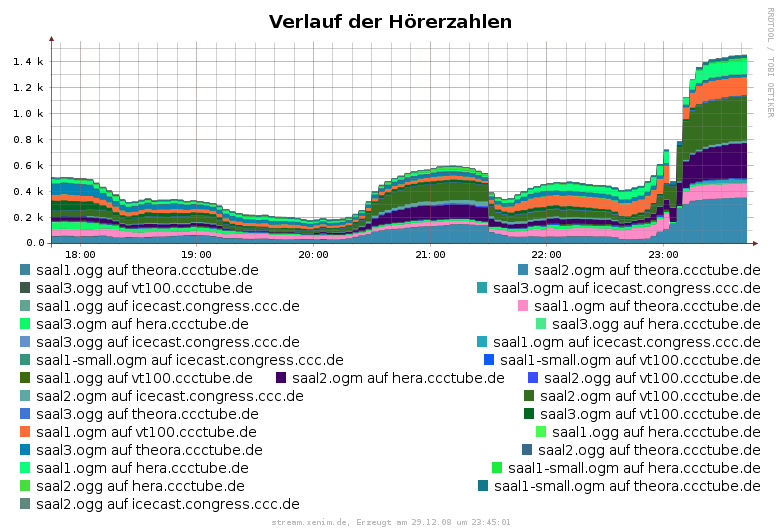
<![CDATA[beim diesj&auml;rigen Hacker Jeopardy beim <a
href='http://events.ccc.de/congress/2008/wiki/Main_Page'>25C3</a>.<br />
Ich habe da u.a. ich beim <a
href='http://events.ccc.de/congress/2008/wiki/Streaming'>Theora Streaming</a> mitgemacht, und wir haben dazu von der <a
href='http://www.fem.tu-ilmenau.de/'>FEM</a> ihre MMS Streams transcoded und Theora
Streams bereitgestellt. Kurz vor Start hatten wir ca. 400 Zuschauer, danach &gt;1200
Zuschauer.<br>
<img src='/images/streaming.png' alt='Stats theora streams'>
<br>
Das ganze auf 4 Servern (2 an der Uni Ulm, einer an der BA Lörrach und einer im BCC)
verteilt.
Sehr coole Aktion!<br>]]>
</div>
</content>

</entry>

</feed>